Redmi Note 7 Pro Review

page2image40327472

Highlights

  • Premium Design
  • Dual Camera Setup
  • Long Battery Life
  • Fast and smooth performance
  • Priced at ₹ 15,999 in India


Xiomi launched the note 7 series back in February. Though it got its media attention back last week when Xiomi announced a new variant of the Note 7 lineup with 6 GB RAM and 64 GB inbuilt storage. Moreover, on Xiomi’s official website, there is also a Jio cash-back offer going on which provides double data benefit on all prepaid recharges worth ₹ 198 and above. So now let’s dig into the specs of this smartphone.

Price

Priced at ₹ 15,999, Xiomi Note 7 Pro is a perfect budget smartphone with decent specifications such as 6GB RAM and 64 GB internal storage. This phone comes in 3 shades – Neptune Blue, Nebula Red and Space Black. All models have a gradient tint which honestly looks great and provides a premium feel.

Design

In terms of design, the phone offers a truly immersive and enriched smartphone experience. The Xiaomi Note 7 Pro has a 6.3-inch full HD bezel-less display with a stylish water-drop notch and 1,080 x 2,340 pixels resolution. It has a pixel density of 409 PPI for a good viewing experience and comes with Corning Gorilla Glass 5 protection against scratches and marks. Furthermore, the back is also surrounded by the gorilla glass panel thus providing a premium holding experience.

Camera

Redmi Note 7 Pro has a dual-camera system on the back – 48 MP wide lens camera along with 5 MP depth sensor. This setup is capable of shooting 4K video recording and also uses Artificial intelligence for scene detection, portraits and night mode. On the front, it sports a 13 MP camera sensor surrounded by the water droplet like notch.

Features

Powered by Qualcomm Snapdragon 675, the phone is equipped with USB type C port and has a fingerprint scanner on the back. The Redmi Note 7 Pro packs a 4,000mAh battery that supports Quick Charge 4.0. Moreover, being a budget phone, it has a fingerprint scanner on the back instead of an in-display fingerprint. It’s also worth noting that besides the RAM and storage, all other specifications of the new model of Redmi Note 7 Pro are the same as the two other old variants. The overall performance of the device is the fastest in the segment with substantial battery backup and on-point connectivity.

Key Specifications –

  • Screen
 – 6.3-inch IPS LCD display at 1080 x 2340 resolution
  • Processor
 – Qualcomm SDM675 Snapdragon 675, octa-core
  • Memory
 – 128 GB, 6 GB RAM or 64 GB, 4/6 GB RAM
  • Rear camera
 – 48 MP + 5 MP (wide + wide with depth sensor)
  • Front camera
 – 13 MP
  • Battery
 – 4,000mAh
  • Charging
 – Fast battery charging 18W (Quick Charge 4)
  • Software
 –  MIUI 10, Android 9.0 (Pie)
  • Biometric security
 – Fingerprint (rear-mounted)


Oneplus 7 Pro Review

page2image39991936

Highlights

  • Notchless 6.7 inch QHD amoled display
  • 90 Hz refresh rate
  • Triple lens rear camera setup
  • Motorised selfie camera
  • In-display fingerprint display
  • Qualcomm Snapdragon 855
  • 4000 mAH battery life
  • 30W warp fast charging

Introduction

Ever since OnePlus debuted with the OnePlus One Smartphone in 2014, It’s mission in this industry has been to create flagship smartphones without flagship pricing. This time they have taken this game to a whole another level. From specs, impressions, cases, and more, here’s everything you could need to know about the OnePlus 7 Pro.

Price

Unlike most flagship smartphones that easily cross $1000 (~ ₹ 68000) mark nowadays, the one plus 7 pro’s pricing starts at $669 ( ~ ₹ 48999 ). The OnePlus 7 Pro is “fully loaded” and has almost all the features that the one-grand-and-up flagships have. With its stunning design, incredible display, improved fingerprint sensor, the OnePlus 7 Pro is the best option out there by a long shot if you are looking for a budget yet premium smartphone experience.

Design

Coming to its design, it has a whopping 88.1% screen
to body ratio. Moreover its also equipped with dual corning gorilla glass 5 (industry’s standard nowadays) panes along with metal chassis. It comes in three beautiful shades – Aurora Blue, Almond and Mirror Gray which honestly looks pretty great in person.

Display

With a 6.67-inch AMOLED display with QHD (1,440 x 3,120 pixels) resolution, this device features a pixel density of 515 PPI, which adds sharpness to its content. Apart from that even more impressive, is the 90Hz refresh rate. Most phone screens have a refresh rate of 60Hz, meaning that everything on the OnePlus 7 Pro moves faster and more fluid than just about anything else.

Camera

One Plus 7 Pro has a triple-lens camera set up; 48 MP main lens, 16 MP ultra-wide lens, and 8 MP telephoto lens. This set up allows it to capture vastly better photos than any of its predecessors. Coming to the motorized selfie camera, I think this is what the ongoing trend is shifting all the smartphone manufacturers too. However I think the design is pretty sturdy, also what’s neat is that if you drop it, the pop-up camera automatically retreats back into its protective shell while in free-fall.

Features

It comes with Qualcomm’s latest top Snapdragon 855 processor along with your choice of 6GB, 8GB or even 12GB of RAM. Moreover it’s also one of the first smartphones to use UFS 3.0 allowing much faster data transfer rate. Furthermore, it also sports an optical in-display fingerprint sensor which is pretty impressive for this phone. Though coming to its battery, it packs 4000 mAH. It doesn’t feature wireless charging which is a bummer but it does come with a warp 30 cable charging. A full charge only takes around 75 minutes from dead. Though I think there are still some drawbacks such as the motorized selfie camera, which also raises the concern of introducing mechanical parts that can be prone to limited shelf life due to debris and dust particles. Moreover, it doesn’t have wireless charging nor IP water resistance rating. Besides that, I think OnePlus 7 Pro is a phone that undercuts rivals on price and offers a better experience in almost every meaningful way to the general consumer.

Key Specifications –

  • Screen
 – 6.67-inch QHD AMOLED display at 3120 x 1440 resolution
  • Processor
 – Qualcomm Snapdragon 855, octa-core, up to 2.84 GHz
  • Memory
 – 6GB/8GB/12GB
  • Camera
 – 48 MP + 16 MP ultra-wide + 8 MP telephoto lens
  • Battery
 – 4,000mAh
  • Charging
 – Warp charging at 30W
  • Software
 – Android 9.0 Pie with OxygenOS
  • Internal storage
 – 128/256GB
  • UFS 3.0
  • Biometric security
 – In-display fingerprint sensor, face unlock


Top 5 Features in Mac OS Catalina

page1image39994800

Highlights

  • Sidecar convert your iPad to the second screen of your Mac
  • Screen time makes its entry to Mac OS
  • iTunes finally gets decluttered
  • All-new “Find My” App
  • Photos App gets revamped

This year’s Apple WWDC was wild from crowd’s standpoint. Whether you want to set up a wireless external side display to your Mac, or you want to keep tabs about where you’re spending your most time in your apps, Mac OS Catalina has something for you. Plus, iTunes is getting split up into different components, and so much more besides. So without wasting time let’s dig right into it.

1. SideCar

This is one of the most impressive feature at WWDC. If you own a Mac and an iPad then there is really good news for you, You can turn your iPad as a second screen to your Mac

and the best part is you can do all this wirelessly as well. This also means that Apple pencil can be used for detailed strokes when the iPad is being used as the second screen.

2. Screen Time

Screen Time is very similar to the iOS app and is now available on Mac OS Catalina. This opens a wide range of options such as App Limitation which limits the daily time spent on a particular app, Content & Privacy Restriction which allows restricting explicit content, purchases, and downloads, Communication which limits the communication to people in your contact’s list and many more. Furthermore, it also provides you analytics about your app usage and the number of device pickups in a day and a week.

3. New Music, Podcast, and TV apps

Till last year’s Mac OS Mojave, iTunes was probably one of the most cluttered app in the mac. If you want to enjoy music, listen to a podcast, watch some shows or even sync your device, you need to use iTunes for that. This was an overwhelming issue for users which Apple has finally listened to. This year’s Mac OS Catalina declutters the iTunes by separating it into 3 different components – Music, Podcast and TV. In my opinion, this is a great move to make things more organised and decluttered. Moreover, to sync data from your iPhone to Mac, you can just go to the finder’s section and jump down to your iPhone’s tab on the sidebar to sync or transfer data.

4. Find My

This is the same app that is introduced for the iPhone in WWDC’19 . This app merges the Find My Friends and Find My iPhone into a single app called Find My. Therefore all the device tracking of your device as well as your loved ones now fit right inside one app. Though what’s impressive is that Apple now also supports offline tracking which allows finding your Apple products even when they don’t have internet access which is a cool feature. This works by sending a secure Bluetooth beacon to other Apple devices near your missing device, then relaying it back to Apple, and to you all in an encrypted manner.

5. Photos App

Apple has also revamped the photos app in Mac OS Catalina. The most notable change in the app is that it now features your best photos for you, while also removing poor- quality photos, duplicate shots and those unrelated old white documents that we clicked the photo of. Moreover, apple is using machine learning as well to highlight important moments and memories, and your Live Photos and videos will now have the ability to auto-play while you scroll through your photo library.


Oppo Reno Review

page2image40327472

Highlights

  • In-display fingerprint sensor
  • Edge-to-edge notch-less display
  • Dual-camera setup
  • 48 MP rear camera with 2160p video shooting capability

Introduction

Oppo Reno is the latest smartphone launched by Oppo in March 2019. With similar specs to Oneplus 7 Pro, the Oppo’s flagship device is a direct competitor in the market of smartphones with notch-less display. Though nowadays a smartphone with a pop-up selfie camera is not new. You can buy one for around Rs 20,000 but the implementation on the Reno makes it exquisite.

Price

Coming to its price, the Oppo Reno is priced at 32,990 with 6GB +128 GB storage. Whereas the higher-end 8GB + 256GB variant can be bought for Rs 49,990.

Design

This particular design used in Reno is currently Oppo’s signature look. The rounded corners and curved sides are modern and sleek and the build quality on the Oppo Reno 10x Zoom is par for the course. Like most smartphones nowadays, the 10x Zoom uses a glass back and metal frame. It comes in 2 shades – Jet black and ocean green. Moreover with no notch or punch hole, the all-display Reno looks pretty good in hands. Apart from that I also liked its unique pop-up selfie camera approach which Oppo calls a “Pivot Rising” structure which is also dubbed as the shark fin popup.

Display

The Oppo Reno sports a 6.6 inch AMOLED display with a resolution of 2340 x 1080. The display itself despite being bright and sharp, the decent color reproduction. The colours are accurate, while also being vivid enough to give you that ‘pop’ you’d expect to see when watching your favourite show. Apart from that, you can also choose to have it cooler or warmer or switch off the dynamic/vivid mode in favour of a flatter sRGB option.

Camera

The Reno has a triple camera system. It has a 48 MP wide lens, 8 MP ultra-wide lens and 13 MP periscopic lens. The triple-lens setup is capable of recording 4K 2160@ 60fps. In the front, it has a 16 MP motorized pop-up camera, capable of shooting 1080@30 fps.

Features

Equipped with Qualcomm snapdragon 855, 8GB RAM and 256GB internal storage, the Reno performs well in terms of processing. Moreover, the in-display optical fingerprint sensor is surprisingly fast. The phone also ships with a 20W fast charger. The Reno has a stereo speaker which is quite good and remains crisp and clear at max volume. Overall for everything that you’re getting, the Oppo Reno 10x Zoom is priced fairly. From performance, design, battery life, and display are all top-notch thus making it a direct competitor with smartphones like Galaxy S10 and Oneplus 7 Pro.

Key Specifications –

  • Screen
 – 6.6-inch AMOLED display at 1080 x 2340 resolution
  • Processor
 – Qualcomm Snapdragon 855 , octa-core
  • Memory
 – 6/8GB RAM, 128/256GB storage with expandable memory slot.
  • Rear camera
 – 48 MP + 13 MP + 8 MP (wide + periscope + ultra wide lens)
  • Front camera – Motorised pop up 16 MP (wide lens)
  • Battery
 – 4,065mAh
  • Charging
 – 20W VOOC fast charging
  • Software
 – ColorOs 6, Android 9.0 (Pie)
  • Biometric security
 – Optical Fingerprint Sensor (under-display)


5 New Features in the iPad OS

ipad os

Highlights

  • New Home-screen
  • Dark Mode
  • New Multitasking features
  • 3rd Party Storage compatibility
  • Sidecar with Mac OS Catalina

Apple announced a separate OS dedicated to iPads in this year’s WWDC. Till last year the iPad used to run on the same iOS that also powered iPhone. However, it did limit the growth of what iPad is capable of doing. This was one of the primary reason why Apple decided to create an OS specifically dedicated to the iPad. This all-new iPad OS adds many new features to the iPad such as new multitasking options, updated home screen, 3rd part storage compatibility and many more.

1. New Home-screen

With iPad OS the widgets now live on the side next to all of your apps. Moreover, your favourite widgets can now also be pinned to the front page which is a pretty handy feature. Furthermore, now you can get more apps on the main screen as apple has added 1 more row and a column to the app’s grid. This was made possible by shrinking the icons and making the dock available for further app additions.

2. Dark Mode

Perhaps the most anticipated feature of the iPad is the dark mode. Combined with the new home-screen, this looks stunning in the night. Moreover, you also have the option to automatically enable dark mode after sunset with just a single click. This is quite useful as it means your iPad won’t glare at you when you decide you’re going to binge-watch something at 11 pm when you actually should be in bed.

3. New Multitasking Features

This is one of the biggest feature that sets the iPad OS apart from IOS. Though for the novice user this can be seen as a bit overwhelming, However, when you get the gist of it, then you can realise how easy they make our lives while multitasking. Apple calls it “Slide Over” which enables you to drag an app from the dock and float it on your screen. Though this isn’t a new feature it has several new improvements compared to the existing multitasking on the iPad. Basically now, you can have multiple apps at once in Slide Over. It’s a collection of apps you can overlay over the main app you’re working in – or over two apps you’re using in Split View. You can now also open two simultaneous tabs of the same app as well, For eg. you can open a mail on one side while composing another one.

4. 3rd Party Compatibility

Finally, you can now connect your iPad with pen-drive, external hard drives or even sync with a DSLR camera directly from your device. There’s also a new column view that’s reminiscent to the approach used in macOS

5. SideCar (iPad as a second screen)

With sidecar, you will be able to use your iPad with your MacBook as a second screen. This is quite a handy feature that lets you use your iPad as a basic display, but also as a drawing tablet when combined with Apple Pencil, which is bound to appeal to users who use their iPads creatively.


Nubia Red Magic 3 Review

Image Source: gadgets.ndtv.com

Highlights

  • Fan based cooling solution
  • 90 Hz refresh rate
  • Affordable Price
  • Long Battery Life
  • Refreshed Design
  • 128 GB, 8 GB RAM
  •  Edge-to-Edge Full HD display
  • Industry First RGB Strip on back


The idea of a dedicated gaming smartphone has always been attractive, but it’s only in the last couple of years that the idea has taken off, thanks to brands like Razer and Asus. Props to the now ever-growing gaming market, new players are now competing for the ultimate gaming smartphone tag. One of them is the 2019 latest entry Nubia Red Magic 3.

Price

Starting at just ₹ 35,999, the Nubia made Red Magic 3 could be a contender for consumer attention simply by the spec sheet alone.

Design

Nubia has taken gaming aesthetics very
seriously with Nubia Red Magic 3, This can be
seen by RGB strip at the back and dark colors
of red and green accent. Surrounded by the
aluminium body, the phone looks sturdy and has a gaming vibe to it.

Display

Red Magic is an absolute beast in terms of display, it has a massive 6.65-inch display along with the full HD+ panel and a resolution of 2340 x 1080 pixels. Furthermore, the 90 Hz refresh rate also makes it run along with the One Plus 7 Pro. Apart from that, colors and contrast are good as well.

Camera

Though being a gaming phone, it’s not expected to have groundbreaking camera system. But it does pack in Sony’s IMX 586 sensor with the 48 MP rear camera (very same as found in OnePlus 7 Pro). On the front, it has a 16 MP selfie camera. Overall the photos are surprisingly decent. The camera is also able to record “8K” resolution however the catch is that it can only capture 15 frames per second which are significantly lower than the standard video capture.

Features

The performance of red magic 3 is top-notch. It is powered by Qualcomm Snapdragon 866 Octa-core processor along with RAM options of 12/8/6 GB. Its speakers are also pretty loud and capable of high-quality sound reproduction. These speakers are DTS:X/ DTS 7.1 with 3D Sound Capability. The red magic 3 also features a massive 5000 mAh battery with up to 30W fast charging. The back of this smartphone is accented with a series of LEDs shining from within. Near the bottom of the back is the Red Magic logo. Now coming gaming, its where this device sets itself apart. Once you flip the dedicated red switch for gaming, this transforms the phone into a gaming space environment, where all the buttons and gestures are given over to the game. Besides this, the dedicated cooling fan also helps in keeping the temperature cool while intense gameplay. This fan and a channel are made of metal through which air is moved, all above a section of thermal foam. It also has bumper buttons on its side that can be used as the”Floating L” and “Floating R” buttons while playing games. Overall this is a decent gaming phone with significantly high-end spec for a mere ₹ 35,999. Because this phone presents a surprising number of positive features, very few drawbacks, and a top-notch overall package this phone is highly recommended for gamers.

Key Specifications –

  • Screen
 – 6.65 inch AMOLED Display at 1080 x 2340 resolution
  • Processor
 – Qualcomm SDM855 Snapdragon 855, Octa-core
  • Memory
 – 256 GB, 12 GB RAM, 128 GB, 8 GB RAM or 64 GB, 6 GB RAM
  • Rear camera
 – 48 MP (capable of shooting 8K at 15fps)
  • Front camera – 16 MP
  • Battery
 – 5000 mAh
  • Charging
 – Fast battery charging 30W
  • Software -
 Android 9.0 (Pie)
  • Biometric security
 – Fingerprint (rear-mounted)


iPhone XS Review

Image Source: skymartbw.com

The iPhone Xs and Xs max are the latest phones launched by apple last year. These phones also have brought much needed feature upgrades that were needed by apple’s previous flagship models. Though compared to current set of choices among smartphones, the iPhone XS isn’t a winner in all aspects but it does strike a right balance when it comes to screen size and body ratio which is very important for user experience now a days.

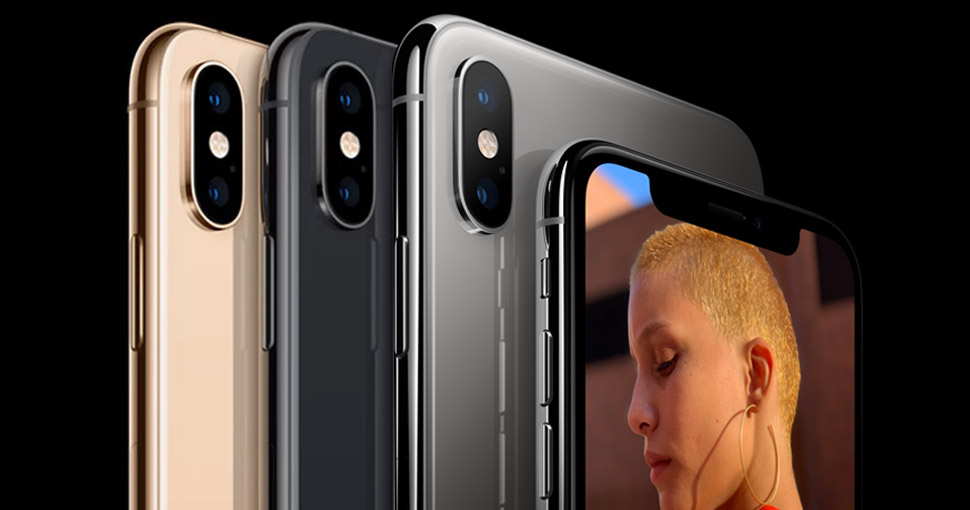
Though when its predecessor iPhone X was launched, apple set a standard for majority of flagship devices by managing to pack edge-to-edge display, replacing the top bezel with a notch and doing away with the home button. This year as well, apple has managed to woo the competition by making iPhone Xs more powerful by using its A12 bionic processor, IP68 water protection and a massive 5.8 inch super retina display. Apart from that apple has also added a brand new gold colour to its current line up which honestly looks really good and has a premium appeal to it.

As far as the camera is concerned, the iPhone Xs has a dual camera setup (wide-angle lens and telephoto lens) which is capable of shooting 4K videos at 60fps. On the front side it sports a 7MP – TrueDepth camera which can shoot photos and videos at 1080p. This year’s iPhone also comes with dual sim capability but with a twist i.e the iPhone XS only accepts the combination of Nano-SIM along with eSIM card.

Furthermore the iPhone Xs comes in 3 beautiful finishes – Gold, Silver & Space Grey along with 3 storage options – 64GB, 256GB and 512GB. Though a 128GB option would be much better as I think now a days, 64GB wont be enough to use iPhone Xs at its full capacity.

Coming to its design, this year’s iPhone with the surgical-grade stainless steel but the screen and rear glass has a new formulation of glass which Apple says is the toughest ever used in a phone. The water-resistance has also been improved to IP68, up from IP67, therefore allowing it to be submerged at a depth of 2m for upto 30 minutes.

Performance wise, the all new A12 bionic processor is 15% faster than the previous A11 chip. With 8 cores, it is also 50% faster in terms of graphics performance and has 50% lower power usage in efficiency cores. According to apple the A12 chip is capable of processing upto trillion operations per second, considerably up from the 600 billion which the A11 could handle. This amount of powerful processing will also allow us to see more augmented reality based apps in the future. Moreover battery life has also been improved a little bit, allowing an additional 30 min extra screen time.

Key Specifications –

  • Display
 – 5.80-inch (1125 x 2436)
  • Processor
 – Apple A12 Bionic
  • Front Camera
 – 7MP
  • Rear Camera
 – 12MP + 12MP (Wide-angle and Telephoto lens)
  • Storage
 – 64GB, 256GB, 512GB
  • iOS 12
  • Price
 – Starting from ₹99,900


Apple Watch Series 1 Review


page2image39927440

Apple Watch Series, the wearable technology lineup of Apple, that started in 2015 has become immensely popular among all the generation. With over 50% Market share, It has clearly dominated the wearable technology Sector. As long as you’re expecting iPhone tied convenience gadget, Apple watch is a fantastic piece of technology and is more focussed towards people who are fitness oriented.

Design

The Apple Watch comes in 2 standard sizes : 38mm and 42mm , both are identical with the only difference in the screen resolution. Apple Watch starts from Rs.18994 onwards all the way to over 1 lakh depending upon the material you choose (Aluminium, Stainless Steel, Ceramic and Gold).

Display

Apple Watch uses the OLED technology. With OLED only the pixels used are turned on, and fewer pixels equals less battery drain.

Lightweight

Personally after wearing it for a while I really loved that unlike other tech watches, it doesn’t feel heavy. Indeed with its gorgeous design, it also has that premium feeling that I really liked a lot

Call

I don’t really use this feature quite a lot but apple do provide support for calling. The only downside is that you need to have iPhone within a certain range to make it functional.

page3image39924112

Music

This is one of the feature that I use quite frequently. The UI is pretty intuitive and with its seamless integration with the iPhone Music. I can easily listen up all my favourite tracks on the apple watch as well.

Health

Equipped with the heart rate sensor, It automatically records my heartbeat, calories, step-count. Personally this is one of the best feature for someone who is a fitness freak and like to keep track of his/her health activities

Mail

The Mail functionality is pretty neat as it allows you to check mails on the go. It also notifies you with its Taptic engine whenever a new mail comes in.

Messaging

The Messaging app in general is nice. It easily notifies you about any messages from any social platform such as WhatsApp, iMessage, Messenger etc. No Doubt, Apple Watch is a great piece of technology and after using it for a while I personally feel that although its is really useful in fitness related activities and in general as well. However the only drawback I do feel is that the battery runs out pretty quickly , therefore you need to charge it up in the night in-order to use it the next day but overall I really liked it.

Key Specifications

  • Internal Storage and RAM – 512 M | 8 GB
  • Water Resistance – IPX7 water resistant
  • Display – 390 x 312 pixels, 303 ppi OLED display
  • Display 3D Touch Support along with brightness upto 450 nits
  • Processor – Dual-core 520 MHz Cortex-A7 and Apple S1P Chip


iPad Pro (11 inch) Review

Image Source: mspoweruser.com

What’s New

  • Completely Redesigned iPad
  • Comes in 12.9 and 11-inch variant
  • A12x Bionic Octa-core processor
  • Edge to Edge display
  • 2388 x 1668 pixels, 264ppi Retina LCD display
  • Face ID
  • USB Type C port
  • Up to 1 TB internal storage


Apple released two very interesting tablets last year, that could be one of the best tablets ever made. With its all-new design, edge to edge display, Face ID, 4 speakers, USB type C Port it packs quite a lot of features. From specs, impression and design. Here’s everything you need to know about the iPad Pro 2018 model.

Price

In India, the 11-inch iPad Pro (non-cellular version) starts at around ₹ 71,900 with 64 GB storage and crosses 1 Lakh mark for 1 TB storage at ₹ 1,39,900. While the bigger model (12.9 inch) retails at Rs. 85,900 for the base 64 GB storage option.

Design

Since its release, the iPad has looked pretty much the same. However, I am glad that 2018 was the year of change for the iPad for its biggest makeover yet. Following the design of the iPhone X, the iPad no longer features a physical home button nor a 3.5 mm headphone jack. This was indeed replaced by a seamless liquid retina edge to edge display which in my opinion looks much better. This also makes the previous generations iPad look outdated in terms of design. Though the bezels aren’t overly small this gives you a little bit extra room to hold the tablet without touching the screen accidentally. The iPad Pro also comes in 2 sizes (11 and 12.9 inches) along with 2 beautiful variants – silver and space grey.

Display

The iPad Pro features a 264ppi “Liquid Retina Display”, which quoting from apple, allows the screen to “follow the curves of the device, while a new backlight design allows the display to extend into the corners.”. Moreover, the iPad also packs in apple’s ProMotion display allowing a refresh rate of up to 120 Hz, thus allowing gamers and designers to experience a much faster refresh rate while using iPad Pro. At the same time, the viewing angles are also very wide and colour reproduction is excellent. Overall the edge to edge display is outstanding and accounts for much better user experience.

Camera

On the backside, the iPad pro has a 12 MP camera (which I find slightly more protruding ) whereas there is a 7MP true depth camera on the front. Though I think the back camera in comparison, gained only minor improvements, retaining the same 12 megapixels as the previous generations iPads. Apart from that the camera is equipped with Smart HDR and is also capable of recording 4K video at up to 60fps which is double the frame rate from last year.

Features

Powered by A12X bionic chip and a 7-core GPU, the graphics performance of the iPad Pro has been 2x than the last year’s iPad. The iPad Pro also comes with Face ID which Apple says is more fast and secure than the Touch ID used in its predecessors model. Moreover, the Face ID is also capable of recognizing the face in both portrait and landscape mode which I find pretty handy. Furthermore, the introduction of USB type C which allows iPad Pro to connect to an external monitor, transfer images from memory cards into Photos, use a wired keyboard or even connect to an Ethernet network. As for audio, the new iPad Pro models come with a four-speaker setup that houses two woofers and two tweeters offering wider stereo sound.

Overall, all the aspects of the 2018 iPad pro are pretty good. Liquid Retina display, 120 Hz refresh rate, the cameras, Face ID, Stereo Speakers all makes it one of the best tablet out there. Though the only downside is its pricing which as mentioned earlier crosses the ₹ 1 Lakh + mark thus making it accessible to only people with a high-end budget.

Key Specifications –

  • Display – 12.9 inches (2048 x 2732 pixels)
  • Processor – Apple A12X Bionic Processor
  • Front Camera – 7MP
  • Rear Camera – 12MP, HDR
  • Storage and RAM – 1 TB, 6 GB RAM or 64/256/512 GB, 4 GB RAM
  • iOS 12
  • Colours – Silver, Space Grey
  • Price – Starting from ₹99,900


Top 6 Features in iOS 13

Image Source: news.yahoo.com

Highlights

  • Dark Mode
  • Revamped Reminders App
  • New privacy features
  • New video editing tools in Photos App
  • Quick Path Keyboard
  • Fully functional browser experience

Apple released the annually iPhone update with iOS 13 at this year’s WWDC. This next edition of the company’s mobile operating system looks like quite an upgrade for both developers and users. Though this is not a public beta release, meaning you won’t be able to install it before iOS 13 gets stable. We have made a list of the top 6 features that makes iOS 13 worth upgrading to.

1. Dark Mode

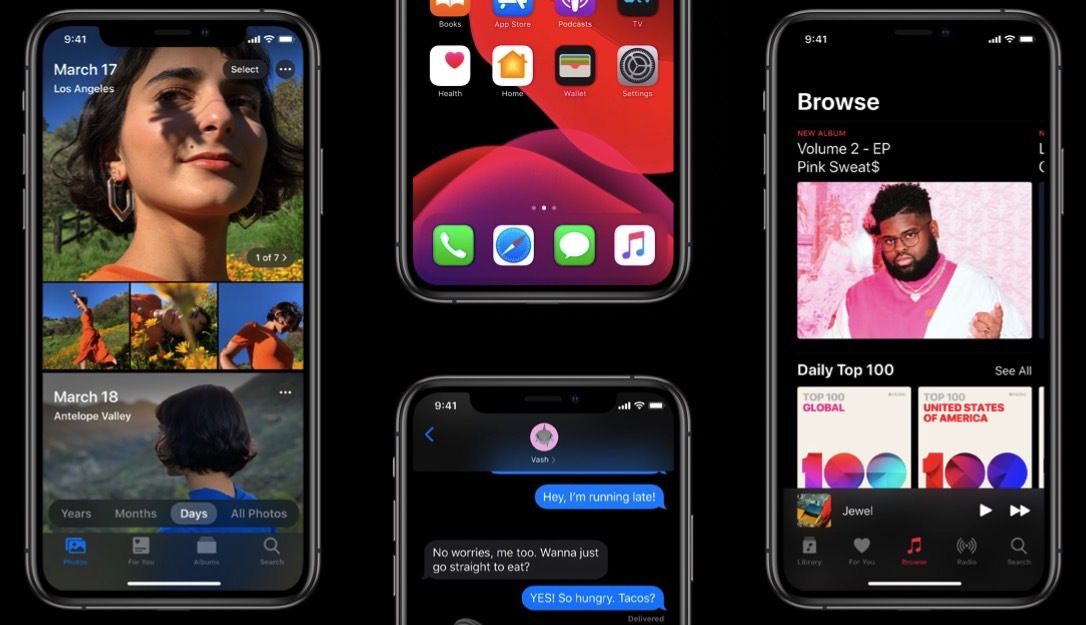
Yes, the dark mode finally makes its entry to the iPhone. This was perhaps the most requested iOS feature of all time. The dark colour scheme is easier on the eyes and seems like a great way to use your iPhone, especially in low-light conditions. Moreover, apple also has implemented a feature allowing to automatically on the dark mode after the sunset and turns off at the sunrise which is quite a handy feature.

2. Revamped Reminders App

Apple has also revamped the reminders app with a lot of features. All apart from a new user interface, there are now Smart Lists headlining the redesigned interface, which cleverly break your tasks out into groups by what needs doing Today, Scheduled, Flagged. Moreover, your list can now also have photos, links and documents in it. Furthermore the reminder now automatically fetches the date, time and the contact mentioned in the list and can later remind you about that on that particular time, a pretty neat feature.

3. New Privacy Feature

Perhaps one of my favourite one, Apple announced that it will be launching a “Sign in with Apple” privacy feature which will allow users to create an account on websites with there apple id. Though what makes it interesting is that unlike Google and Facebook, it won’t be storing any sort of information about the user, which also means that you won’t be bombarded with those smart ads that consume your personal information or those marketing email that you never subscribed up for.

4. Video Editing Tools in the Photos App

With iOS 13, you can finally edit videos right inside the photos app. All those photo editing features of iOS 12 have made there way to videos as well. That means you can rotate, crop and even change the colour settings of the videos. iOS 13 now makes it easier to make quick edits to that footage, which is great for quick YouTube or social media videos.

5. Quick Path Keyboard

Remember installing those 3rd party apps like swiftkey to draw across the keyboard to type words? iOS 13 has built that right into its keyboard. Moreover, using your history of typing, it also gets smart at predicting your sentences which is pretty cool. This also results in way quicker and accurate typing than ever before!

6. Safari just got better

With iOS 13, you can now download videos, photos and documents right from the browser i.e no need for external 3rd party file manager to download your files anymore. This also follows up with updated safari’s browsing experience which includes favourites, frequently visited websites, and the websites you’ve recently viewed along with an updated start page design.